
If Perplexity can't find your company, start by checking whether its search crawler, PerplexityBot, can reach your site: whether robots.txt blocks it and whether your firewall blocks its published IP addresses. The other crawler, Perplexity-User, only fetches pages when someone asks a question and does not handle search indexing.
According to Perplexity's documentation, its search results link to websites and its responses may include links to the pages it read, which makes it easy to check the sources yourself. Below you will find how the two crawlers divide the work, followed by four checks that need no extra software. For ChatGPT, see How to Get ChatGPT to Recommend Your Website.
What is the difference between Perplexity's two crawlers?
PerplexityBot handles search results; Perplexity-User fetches pages live when a user asks something. The Perplexity crawler documentation (checked October 2026) says PerplexityBot "is designed to surface and link websites in search results on Perplexity" and "is not used to crawl content for AI foundation models". To appear in search results, Perplexity recommends allowing PerplexityBot in robots.txt and permitting requests from its published IP ranges.
The same page explains that when users ask Perplexity a question, Perplexity-User "might visit a web page to help provide an accurate answer and include a link to the page in its response". It is not used for web crawling or for collecting training content. Because a user requested the fetch, the documentation says this fetcher "generally ignores robots.txt rules".
| Crawler | Purpose | Used for training? | robots.txt | Official IP list |
|---|---|---|---|---|
| PerplexityBot | Surfaces and links websites in search results | Officially no | Perplexity recommends allowing it | perplexitybot.json |
| Perplexity-User | Fetches pages when users ask, links them in answers | Officially no | Generally ignored | perplexity-user.json |
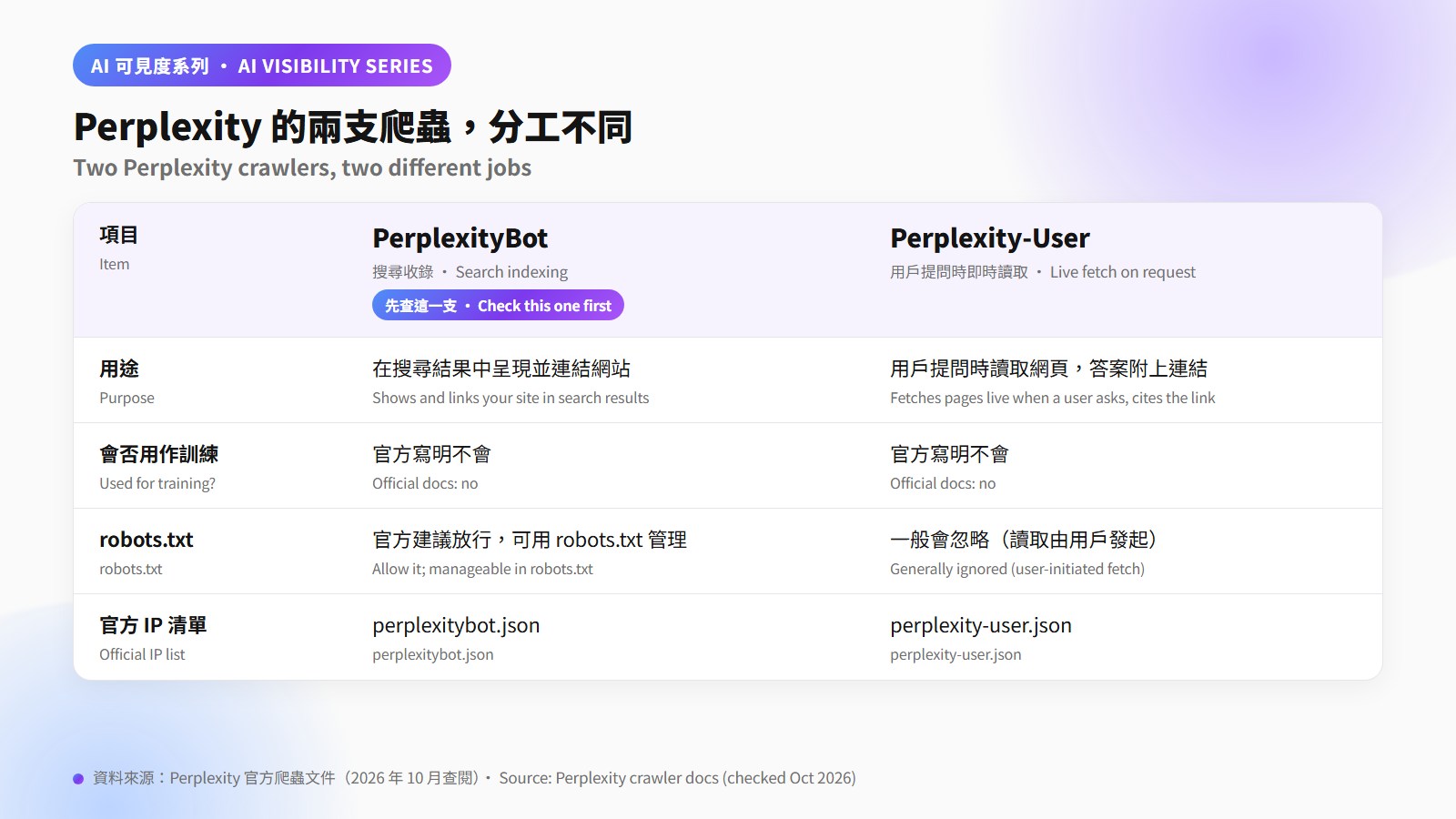
So when Perplexity can't find you, PerplexityBot is the one to check. OpenAI's crawler documentation describes a similar split: OAI-SearchBot for search, ChatGPT-User for user actions.
Step one: does robots.txt block PerplexityBot?
Open yourdomain/robots.txt in a browser and search for PerplexityBot. If it has Disallow: / under it, or User-agent: * has Disallow: / with no separate rule opening the site to PerplexityBot, it is blocked. Also make sure robots.txt opens as plain-text rules rather than redirecting to another page or showing an error page. Perplexity does not document how it handles those cases, so the safest option is a rules file that can be read directly. To allow it:
User-agent: PerplexityBot
Allow: /
The Perplexity documentation says each setting works independently and changes may take up to 24 hours to take effect, so test again the next day. For the wider list of AI crawlers and their rules, see AI Crawlers Explained: GPTBot, ClaudeBot, and robots.txt.
Step two: is your firewall blocking Perplexity's official IP addresses?
Even with robots.txt open, a firewall can still block the requests, so allow them by Perplexity's official IP lists. The Perplexity documentation publishes two lists: perplexitybot.json for PerplexityBot and perplexity-user.json for Perplexity-User. It recommends matching each User-Agent against its own IP ranges. A User-Agent is only a self-declared name, and Perplexity's best practice is to check both together for better security while still letting the real crawlers in.
The documentation covers two common firewalls:
- Cloudflare: under Security rules, create a custom rule where the User-Agent contains PerplexityBot and the source IP is in the official list, set the action to Skip, select the security features to bypass (Perplexity's examples include All remaining custom rules, All managed rules and All rate limiting rules), and place it above any rule that blocks or challenges requests, because a Skip rule only bypasses rules that run after it. Perplexity warns that Bot Fight Mode cannot be skipped with custom rules and may still challenge its crawlers.
- AWS WAF: create one IP set per crawler, build a rule that matches both the IP set and the User-Agent, set it to Allow, and give it a higher priority than your blocking rules.
The same documentation says the IP lists are updated regularly and suggests fetching them automatically. If a web agency or hosting provider manages your site, send them both JSON links. Once the rules are in place, search your server access logs for PerplexityBot and confirm the source IPs appear in the official list.
Step three: when you ask Perplexity about your brand, which pages does it cite?
Ask Perplexity directly and see whether the links in the answer include your website. The documentation says PerplexityBot is designed to link websites in search results and Perplexity-User may include a link to the page it read. When an answer has links, open each one and check it.
Try three kinds of question:
- Brand: "What does Company X do?"
- Service plus district: "Which interior design firms are in Tsuen Wan?"
- Comparison: "How does Company X differ from similar services?"
For each answer, note whether you are mentioned, whether the links point to your site and whether the details are right. Keep a screenshot and the date, and rerun the same questions after you change the site. If the answers cite only third-party pages and never your own site, go back to steps one and two.
Step four: what else can't AI read? Check with AEO Auditor
Once crawlers can get in, the next question is whether they can understand the content. AEO Auditor runs a free check from a single URL, and its report covers AI crawler accessibility, schema markup and content answerability. Content problems such as sentences that cannot stand alone or inconsistent brand details are explained in Why ChatGPT Can't Find Your Company Website, and are worth checking at the same time.
Frequently asked questions
Does PerplexityBot use my content to train AI models?
Perplexity's documentation says PerplexityBot is not used to crawl content for AI foundation models, and Perplexity-User is not used to collect content for training.
Can robots.txt block Perplexity-User?
Perplexity's documentation says that because a user requested the fetch, Perplexity-User generally ignores robots.txt rules. Firewall rules can be set separately for each crawler by User-Agent and its official IP list.
How long does Perplexity take to pick up robots.txt changes?
Perplexity's documentation says it may take up to 24 hours for its systems to reflect robots.txt changes.
Why is Perplexity still blocked on my Cloudflare site?
Bot Fight Mode is one possible cause. Perplexity's documentation says it cannot be skipped with custom rules and may still challenge its crawlers. Also check that your allow rule sits above your blocking rules and that you selected the security features it should bypass.
Sources
- Perplexity, Perplexity Crawlers: https://docs.perplexity.ai/docs/resources/perplexity-crawlers (checked 2026-10-31)
- Perplexity, PerplexityBot IP ranges: https://www.perplexity.ai/perplexitybot.json (checked 2026-10-31)
- Perplexity, Perplexity-User IP ranges: https://www.perplexity.ai/perplexity-user.json (checked 2026-10-31)
- OpenAI, Overview of OpenAI Crawlers: https://developers.openai.com/api/docs/bots (checked 2026-10-31)