Mobile payment

 PayMe
PayMe

 WeChat Pay / Alipay
 Octopus
- Open the corresponding payment app and scan the QR code above.
- Enter the invoice amount and confirm payment.
- Take a screenshot of the payment confirmation and send it with your invoice number to billing@udomain.hk, or fax it to (+852) 2554 7215.
Online payment




You have an invoice
Log in to pay.udomain.hk and enter your invoice number to pay.
You don't have an invoice yet
Log in to addpay.udomain.hk to pay directly.
* Invoices of HK$10,000 or more incur an additional 4% handling fee.
Bank transfer (deposit / e-cheque / FPS)
Deposit your payment into any of the following accounts:
- E-cheques must be made payable to "UDomain Web Hosting Company Limited" in HKD.
- After transferring, write your order number, invoice number, or domain on the deposit receipt and email it to billing@ud.hk or fax it to (+852) 2554 7215 for verification.
Cryptocurrency


- Log in to addpay.udomain.hk.
- Follow the instructions to complete payment.
- Submit your payment record for verification.
Top up via customer panel
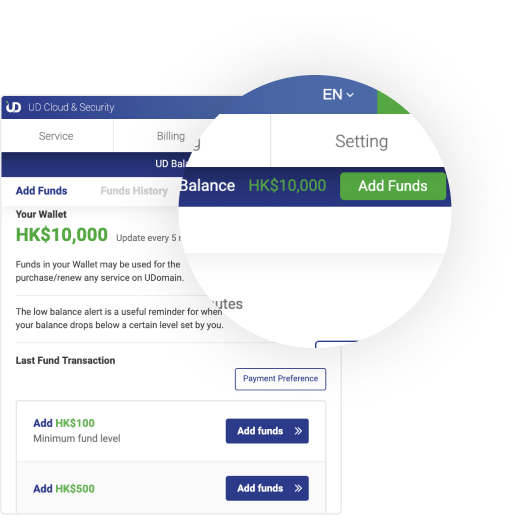
Existing UD / OpenCloud customers can log in to the customer panel and top up their wallet directly. The balance can then be used to purchase or renew any UD service.
- Log in to passport.8338.hk.
- Go to Billing → UD Balance → Add Funds.
- Choose an amount and complete payment.